WordPress vs EmDash (2026): Which Fits Your Next Site?
EmDash is an open-source content management system from Cloudflare, built in TypeScript on the Astro framework. Cloudflare introduced it as a spiritual successor to WordPress, and version 1.0 marked its first stable release.
This article compares EmDash with WordPress based on the kind of site you are building and who will edit it. I have read up on EmDash and watched demos. Some of it does not impress me yet, but the project is early. We like many of Cloudflare’s products and value what the company does for the web. For our own sites, we would start with a pilot before committing to a migration.
What EmDash Is And Who Is Behind It
Cloudflare stewards EmDash under the MIT license, while WordPress uses GPLv2 or later. Cloudflare’s launch post says that no WordPress code went into it and that AI agents built much of it over two months. EmDash maintainer Matt Kane is also an Astro core maintainer. The Astro Technology Company team also joined Cloudflare.
An EmDash site can run on Cloudflare Workers with D1 and R2, or on a supported Node.js host with SQLite, libSQL, or PostgreSQL. The current Node.js deployment guide requires version 22.23.4 or newer; 22.16.0 is sufficient for Astro 7.3 or earlier. The admin has five roles: Admin, Editor, Author, Contributor, and Subscriber. Passkeys are the default login method. Its sidebar groups content with tools for menus, redirects, widgets, content types, plugins, and imports.
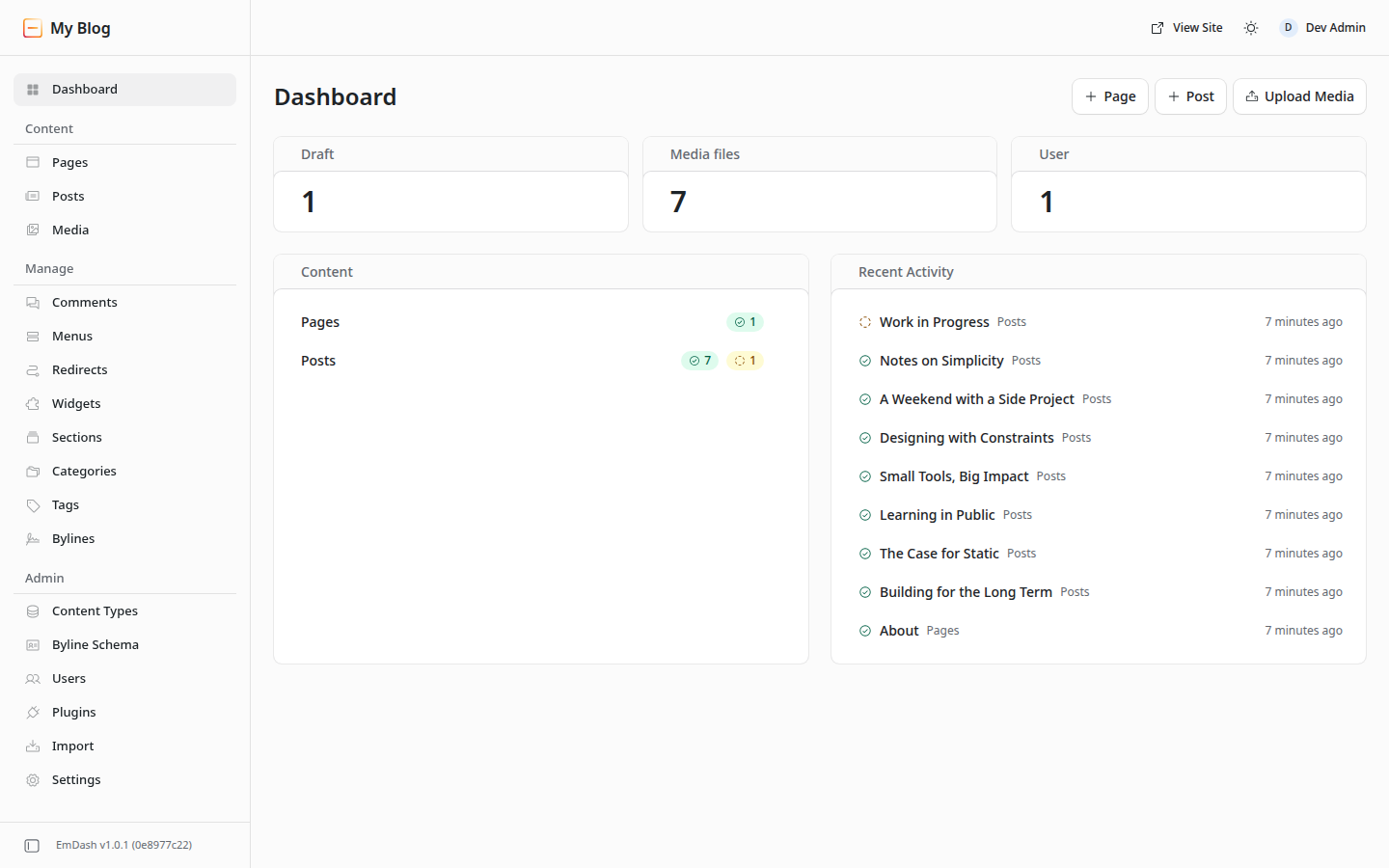
Posts open in a TipTap editor and are stored as Portable Text, a JSON format for content. The editing screen keeps publishing and the slug in a sidebar beside the content. Bylines and categories live there too.
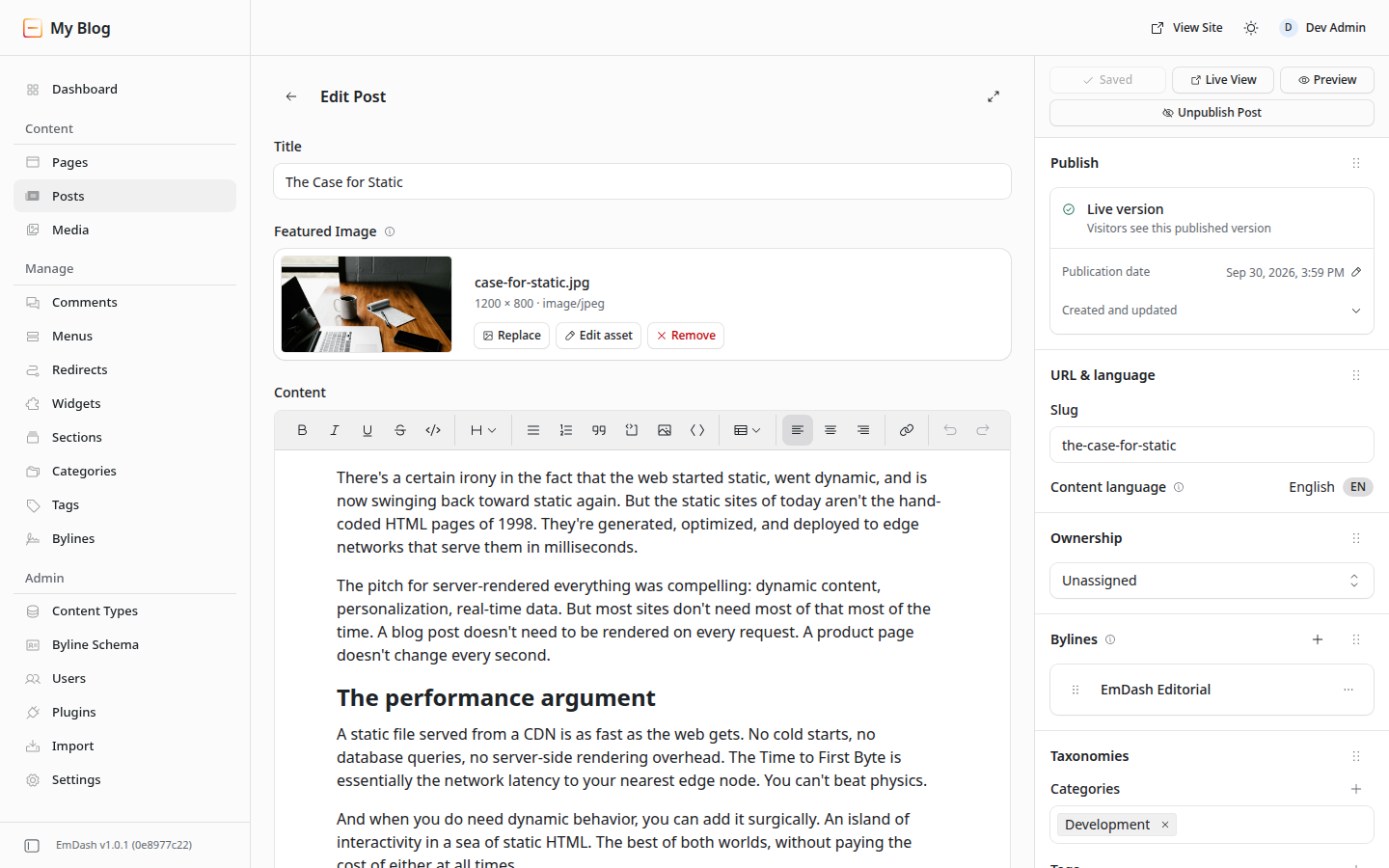
TipTap is an open-source, headless editor framework. EmDash uses it for the Content field and saves what you write as Portable Text.
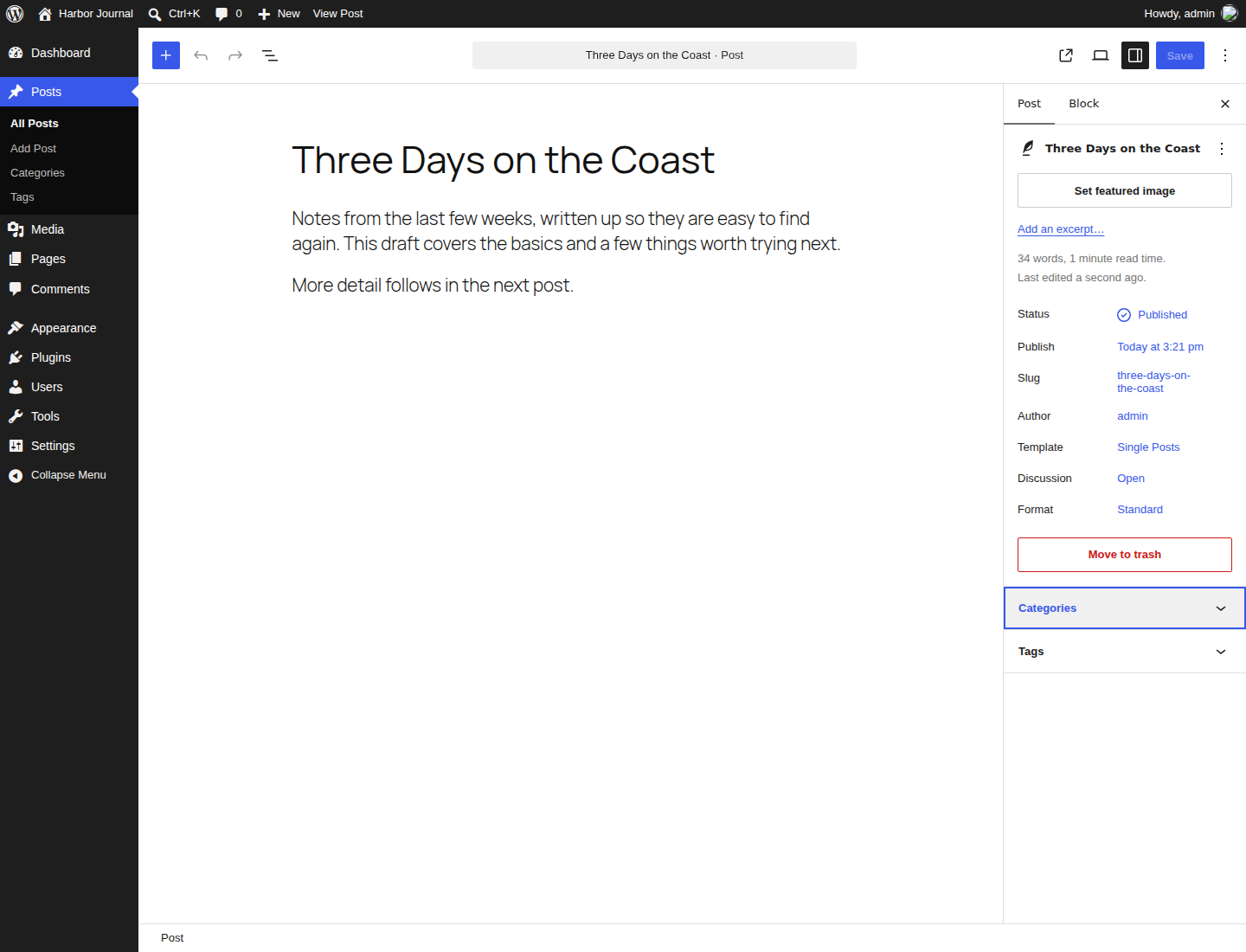
WordPress edits the same kind of post in its block editor, with post settings in its own sidebar.
Themes are Astro projects built from routes, layouts, and components. They query content through the EmDash runtime; they are not sandboxed like registry plugins. This development model shapes what happens when you move a site, as the migration section explains.
What EmDash Includes And What Still Needs Planning
EmDash 1.0 established a stable release, and later versions have expanded it. Its current features include:
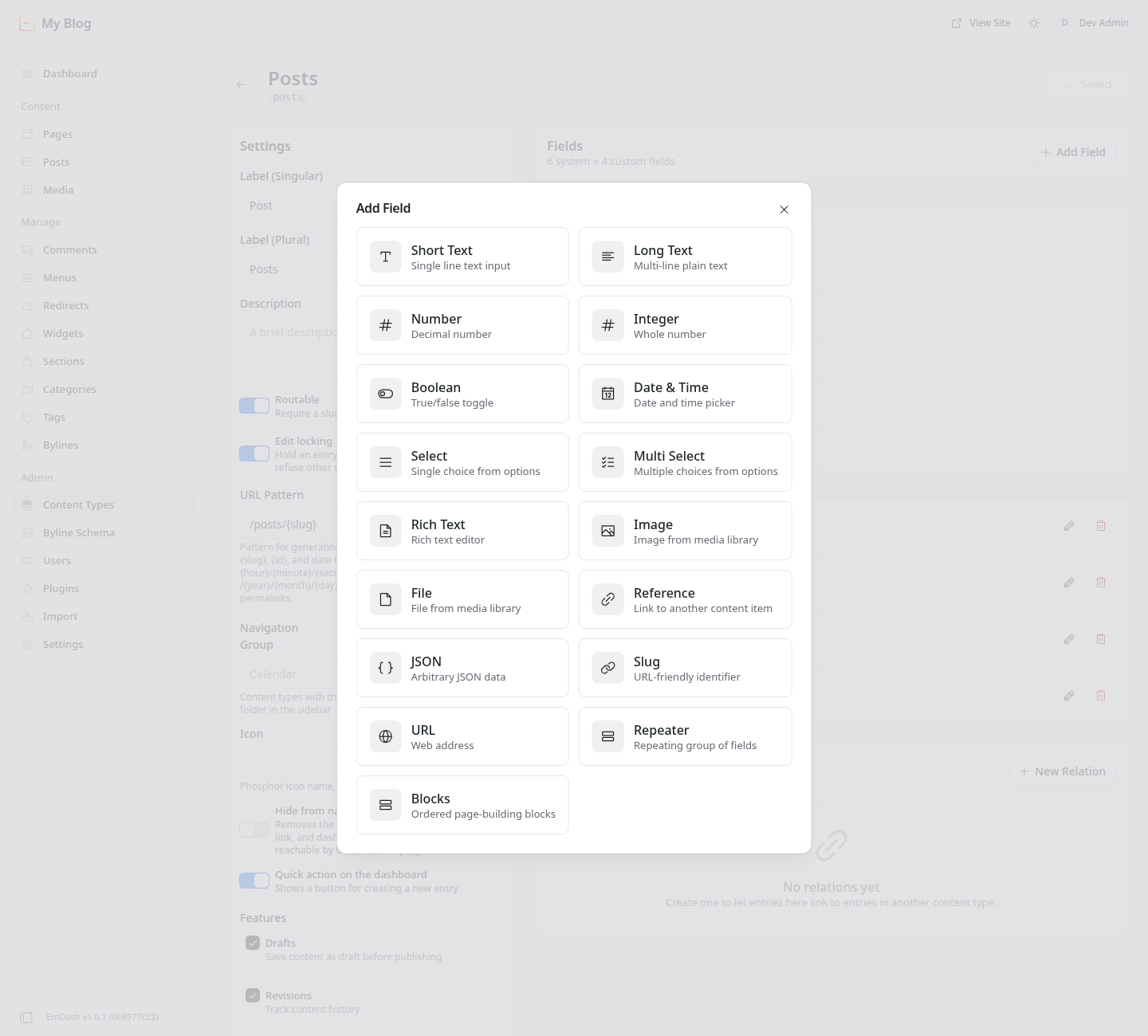
- Collections with 17 built-in field types, including reference fields that link entries and repeater fields for structured rows.
- Sandboxed plugins on Cloudflare Workers and on Node.js.
- A WordPress import that takes either a WXR file or the output of an exporter plugin installed on the live site.
- A built-in MCP server, a command-line tool, and Agent Skills for building, upgrading, and porting sites and plugins.
- Optional per-request payments through the separate x402 integration.
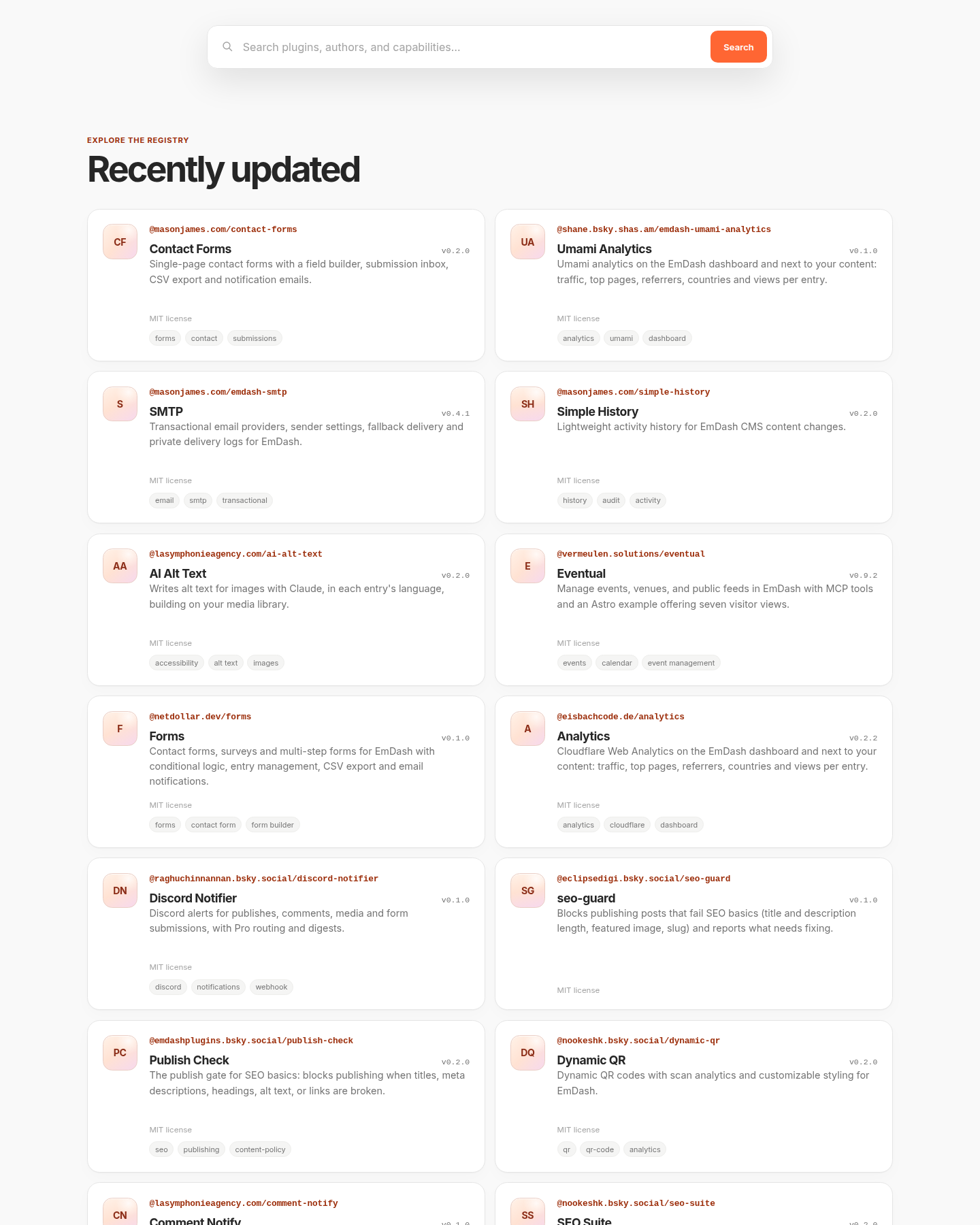
Compared with WordPress, the official registry offers a much smaller selection of plugins. Cloudflare’s 1.0 announcement described paid registry support as a future goal. EmDash uses Astro templates rather than WordPress-style theme switching, and third-party themes are available. Its block composition system lets editors add and reorder developer-defined sections, but it is not a general-purpose visual page builder like Divi.
The registry’s home page lists each plugin with its author, its version, and its license with tags.
Cloudflare moved its own blog to EmDash. Its migration write-up describes gaps the team addressed around media, search, bylines, localization, SEO, and editor usability. Scheduled publishing arrived in version 0.19.0; it is supported in current releases.
Plugin Security On Each Side
Plugin isolation is a central part of EmDash’s design. Each sandboxed plugin runs with the capabilities it declares and the administrator approves. On Cloudflare, it runs in a Dynamic Worker; on Node.js, a separate workerd process provides isolation. Cloudflare deployments need the Workers Paid plan for this sandbox. Native plugins run in the server process without that isolation. Approved permissions still allow real changes, so sandboxing does not remove the need to trust a plugin’s publisher.
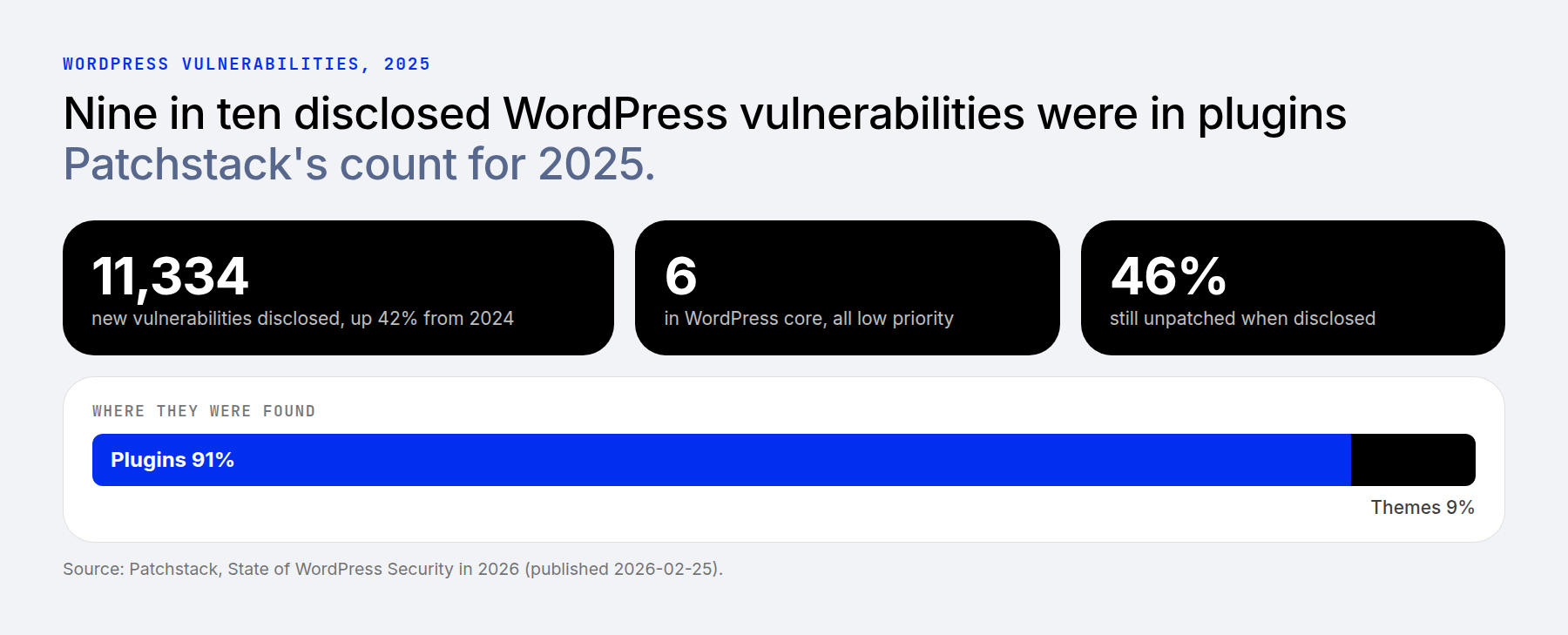
WordPress’s plugin risk is measurable. Patchstack’s security report counted 11,334 new vulnerabilities in the reporting period, a 42% increase over the previous period, with 91% in plugins, 9% in themes, and 6 in core. Of those, 46% were still unpatched at disclosure.
I vet every plugin before it goes on a site. I keep a closed repertoire, the same short list on all my sites, and I use Patchstack where I can. Vulnerabilities are increasing, at least in the number being found. I think I am not as exposed to them, because I have strong infrastructure around each site.
For WordPress, use a maintained set of plugins from trusted sources, remove plugins you no longer need, and test updates on staging. Review security advisories and the developer’s response to them. Install counts and the date of the last update can inform that review, but neither proves that a plugin is secure.
Patchstack’s plugin listing describes free vulnerability alerts; active mitigation requires a paid plan. Its Developer plan is listed at $69 per month for 25 sites when billed annually. Check current plan terms before budgeting.
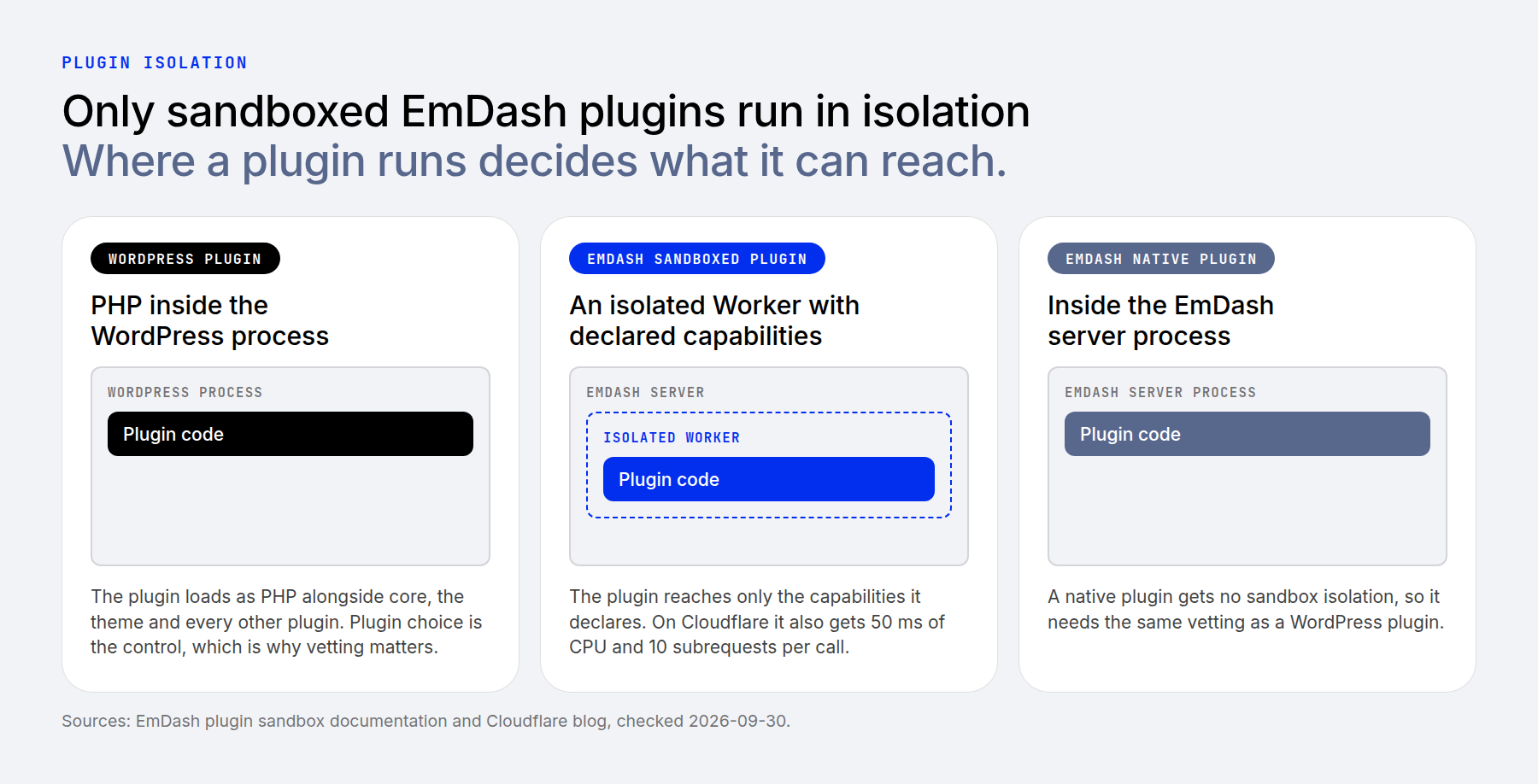
The sandbox only helps when the required plugin can operate within it. WordPress has a far larger plugin ecosystem, but a small vetted list does not provide runtime isolation. Vetting, timely updates, backups, and monitoring manage risk; they do not eliminate it.
Building Structured Sites: Content Types, Fields, And Settings
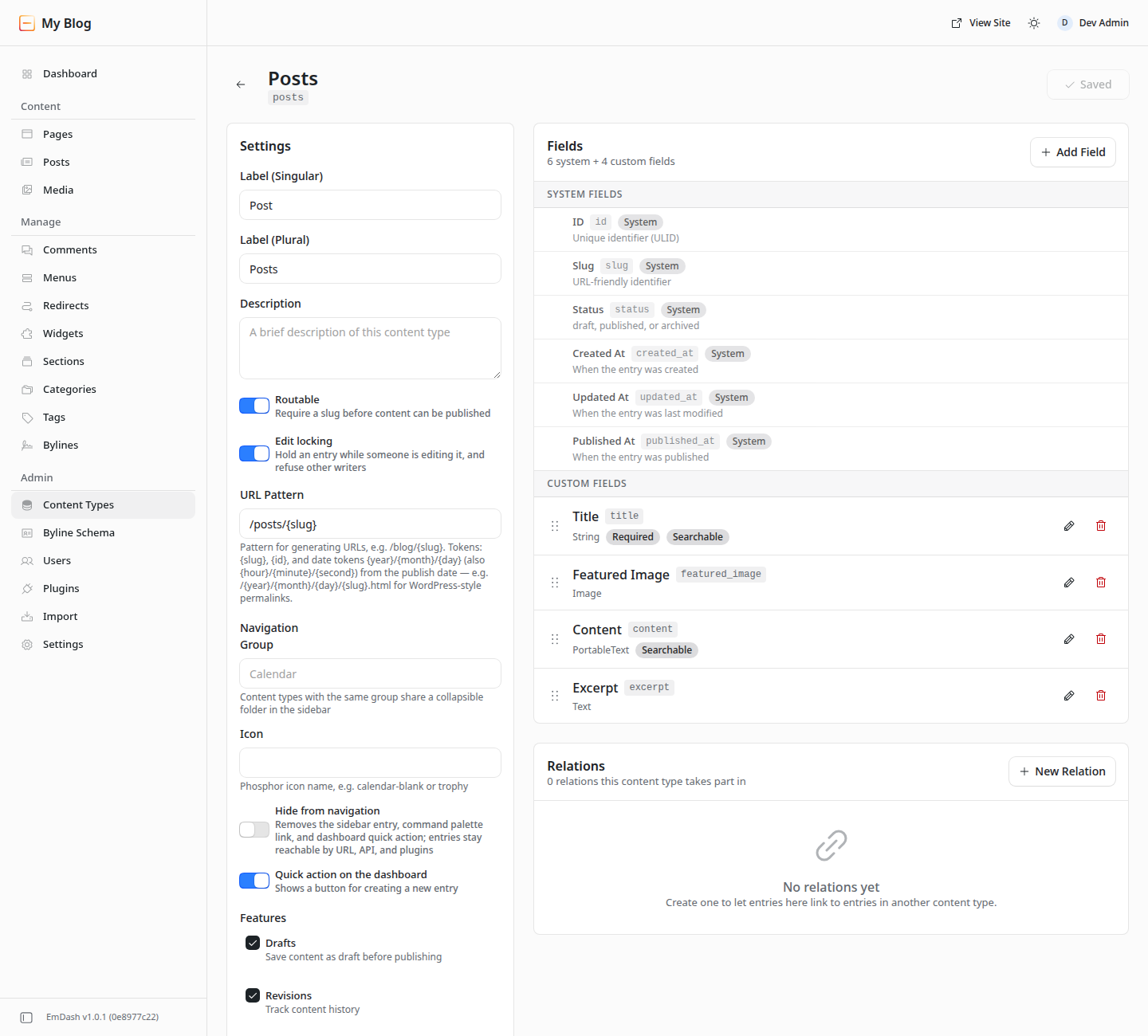
I build sites around options pages and custom post types with custom fields. Clients edit settings on the options pages and add new posts with a defined set of obvious fields. EmDash comes close in the second half. You create a collection in the admin under Content Types or with the command-line tool, and the schema is read from the database at runtime.
The Add Field dialog lists all 17 field types. They include reference fields that link entries across collections and repeater fields that hold structured rows.
WordPress includes APIs for custom post types and post metadata in core. Code or plugins provide the editing interface. The free Secure Custom Fields plugin can register post types and taxonomies as well as field groups, repeaters, and options pages.
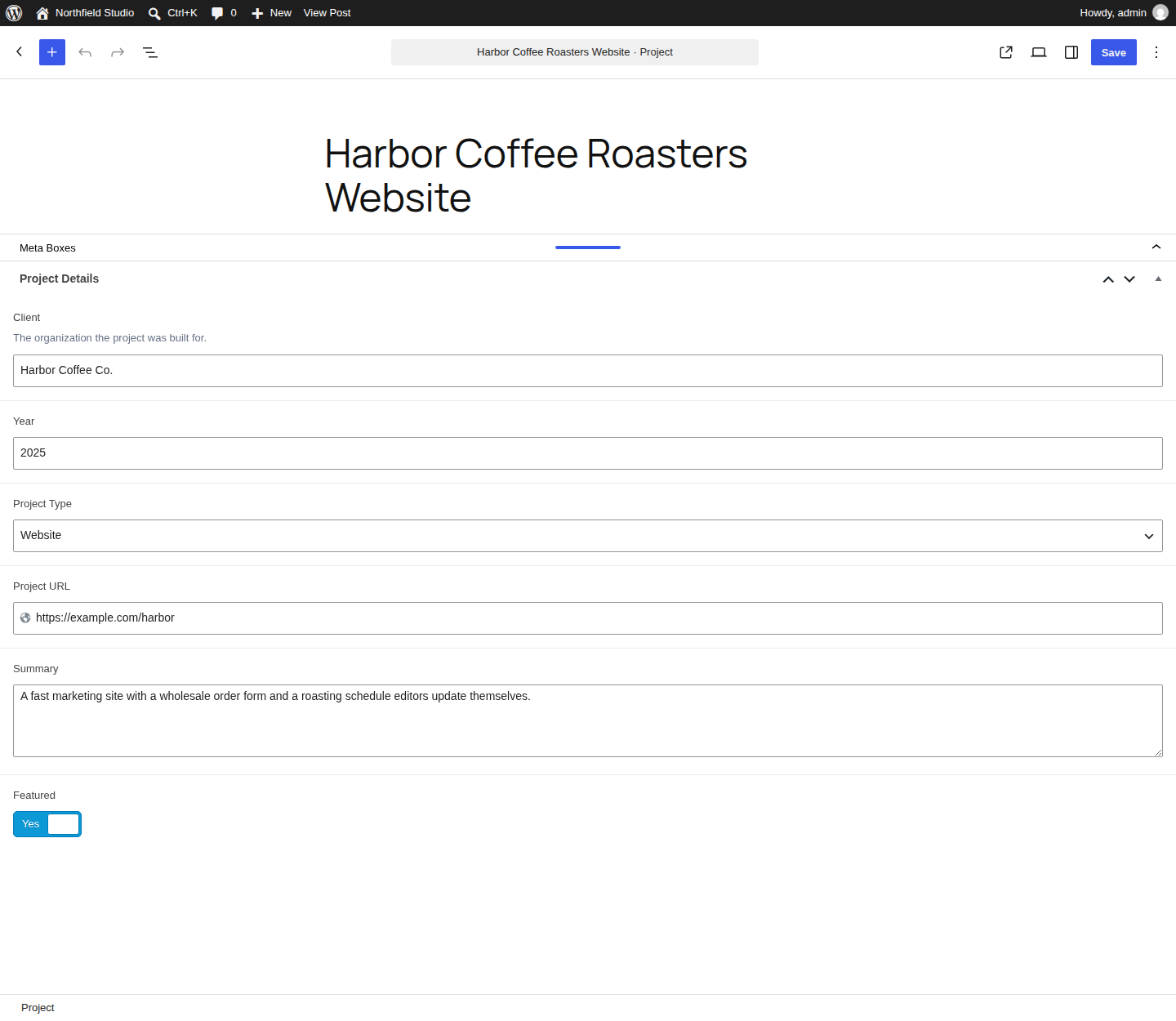
Site-wide options need a different setup. EmDash’s built-in Settings screens cover site identity, social profiles, and SEO defaults. Custom client controls can be implemented through plugin settings and admin pages. That makes a phone number, booking link, or banner toggle possible, but it requires development and template integration rather than an options-page workflow already configured in a fields plugin.
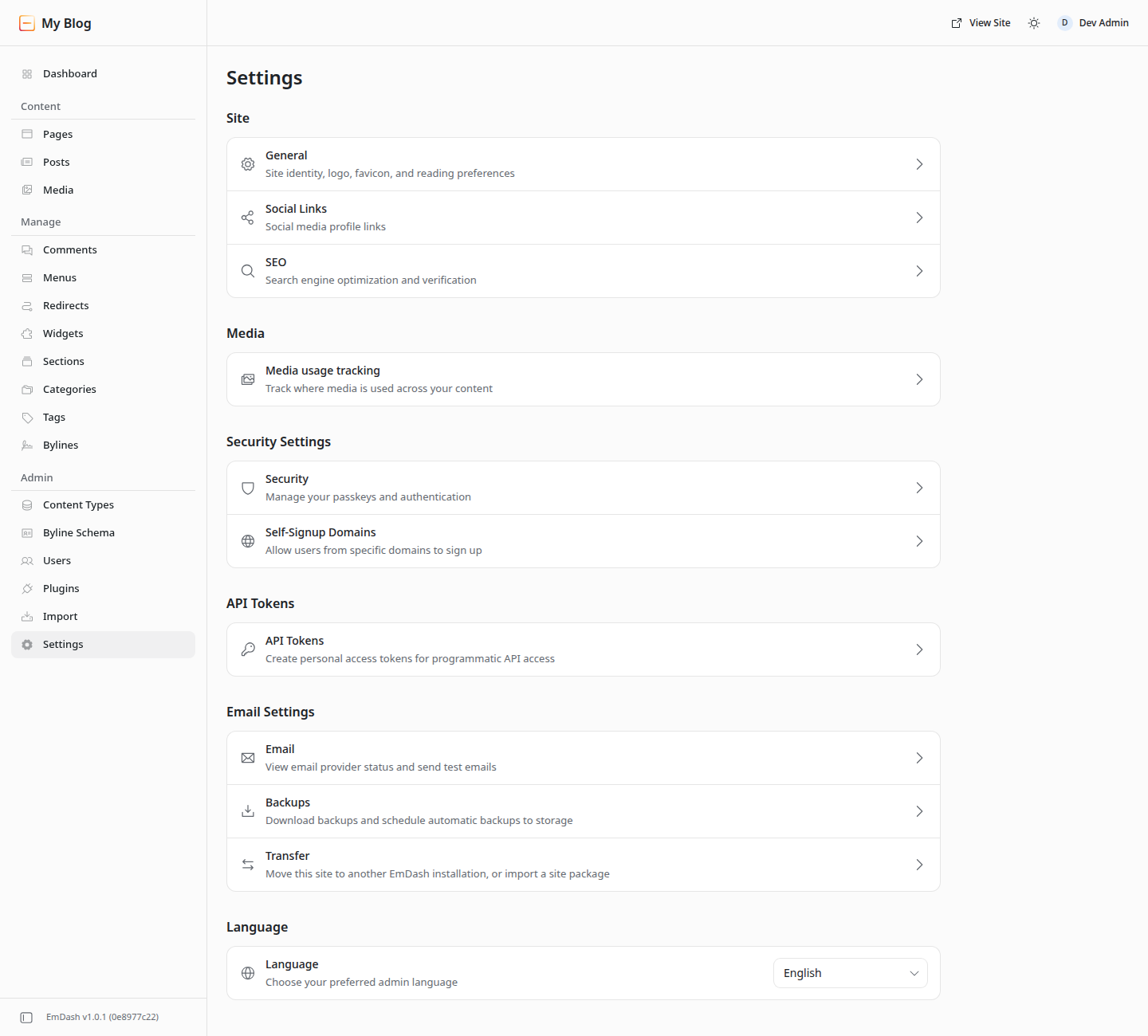
On WordPress, an options page comes from a fields plugin, and the client edits it in the same admin as everything else.
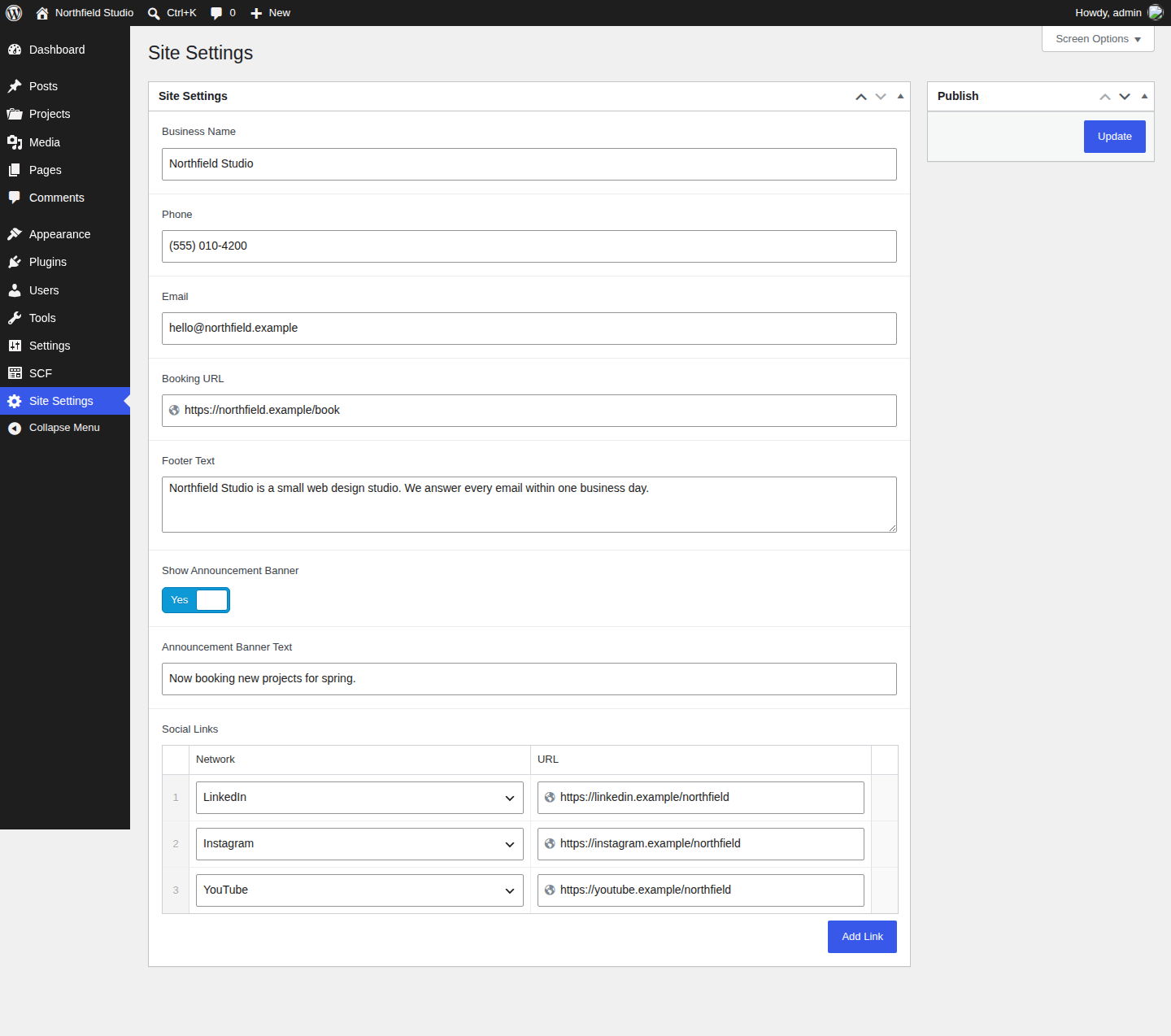
A phone number, a booking link, and a banner toggle all live on that one screen.
Routine WordPress Features That Need Rethinking On EmDash
Some WordPress features are routine because a plugin covers them in minutes. EmDash builds several into core. It covers an SEO panel with sitemaps, redirects with a 404 log, comments, and menus. Full-text search, multilingual content management, scheduling, and revisions are also supported. Multilingual content management does not mean that the CMS automatically translates the site. Forms and stores are where the routine changes, and so are email and premium add-ons.
Forms illustrate the difference in setup. EmDash has form plugins, but check each one’s rendering instructions: some require a companion package in the Astro project and an initial build and deployment. Installing a registry plugin alone does not necessarily put a form on the public page. On WordPress.org, Contact Form 7 lists 10+ million active installations, and WPForms Lite lists 5+ million. Forms can be placed through the supported block or shortcode. A builder such as Divi also provides a Gravity Forms module when that plugin is installed.
EmDash commerce is developing too. Urumi now offers Otta, an open-source commerce layer for EmDash. Before choosing it, verify the payment, shipping, tax, and integration requirements of the particular store. WordPress’s WooCommerce has a much longer-established ecosystem and lists 7+ million active installations. Divi adds WooCommerce modules for building product and store layouts.
The separate x402 package can charge for access to a resource through HTTP payment requests. It is not a shopping cart and should be evaluated separately from Otta or WooCommerce.
Visual Editing, Email, And The Rest
The distinction is between editing content and designing layouts. EmDash supports inline editing on the page, and editors can compose predefined blocks or select layouts when a developer has configured them. New layouts and styling still involve Astro development. On WordPress, Divi’s Visual Builder gives clients visual controls for designing the page itself.
Email needs a provider plugin in production. Without one, invites must be copied by hand. For paid add-ons, check the vendor’s licensing, update, and support terms separately; a free registry listing does not establish those services.
Moving A WordPress Site To EmDash
The WordPress import screen accepts a WXR export file, an EmDash Exporter migration key, or a site URL. The URL route still needs the exporter for an authenticated import; without it, EmDash only probes the public REST API. WXR imports use the data present in the export, and attachment URLs must remain accessible so media can be copied. The exporter can bring supported custom meta and SEO fields; comments, menus, the logo, and favicon require exporter 1.2.0 or later. Review field mappings and references rather than assuming a complete one-to-one conversion.
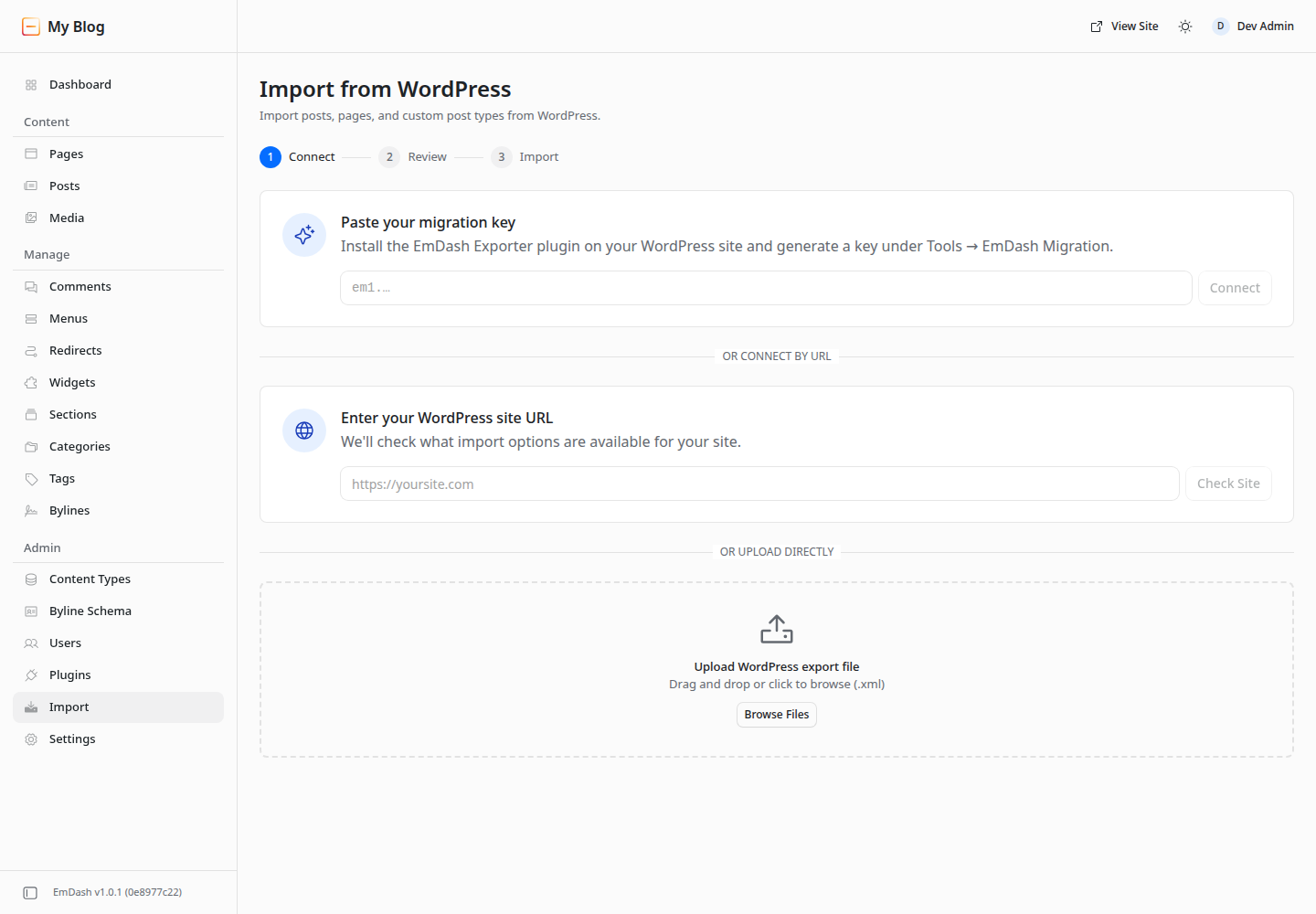
Themes are not imported. You port them by hand, and the migration docs tell you to check shortcodes, page-builder markup, and plugin-defined blocks after the import. A site built with a page builder moves as content, and its layouts are rebuilt as Astro pages.
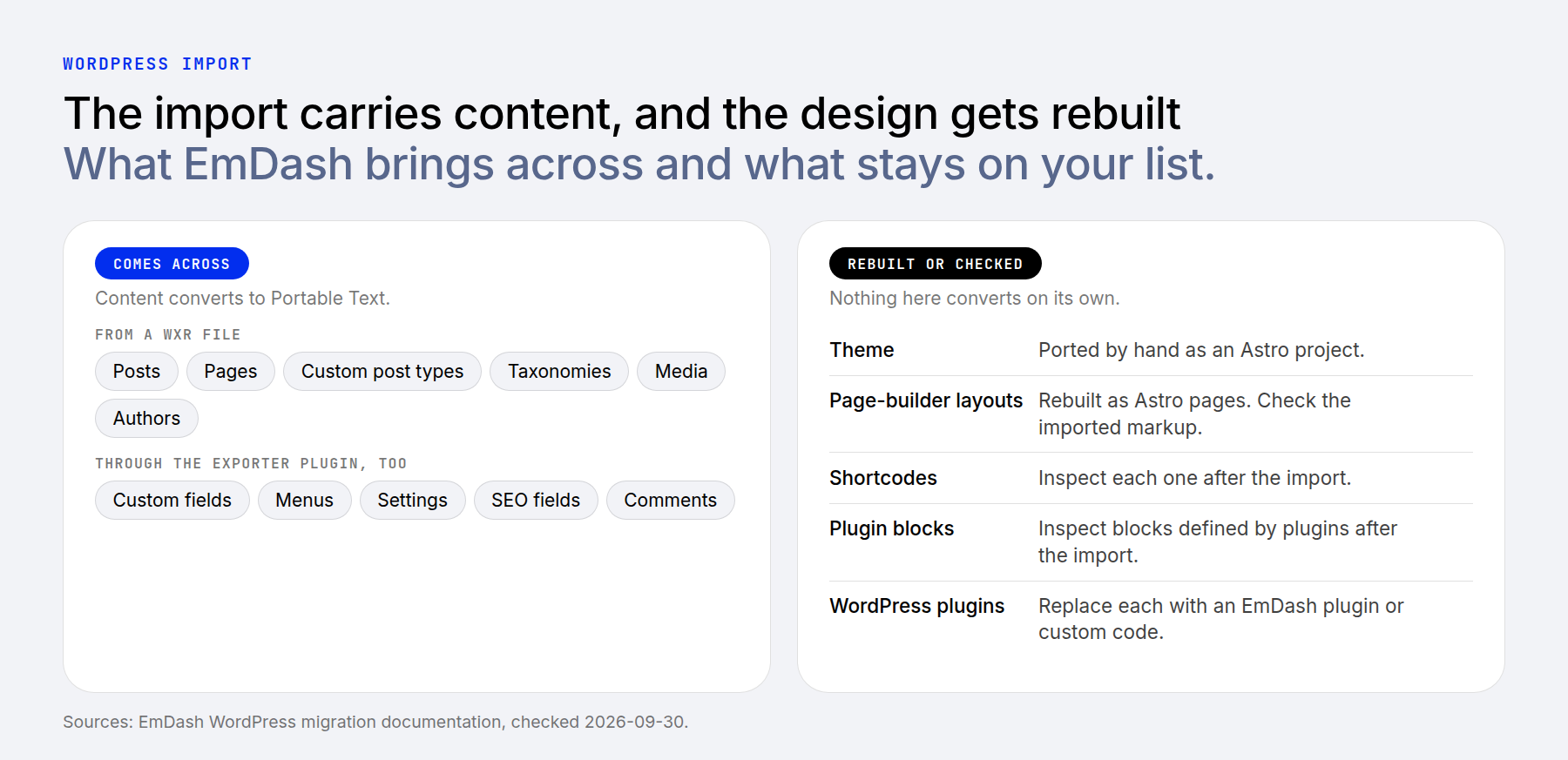
Current imports use bounded chunks, but a successful import still needs verification. Compare content counts, review representative pages, check media and authors, and test redirects and any imported settings. EmDash’s theme- and plugin-porting Agent Skills can help with the rebuild; they do not make WordPress plugins or layouts directly compatible.
AI Agents On Each Side
AI has made me far more productive on WordPress. EmDash treats agents as a first-class user, with an MCP server built in at /_emdash/api/mcp. It authenticates with OAuth 2.1 or personal access tokens and never grants more than the user’s role. Its tools cover content, schemas, media, taxonomies, menus, revisions, and settings, and plugins can expose additional MCP tools.
WordPress builds the pieces in core. The Abilities API arrived in version 6.9 and lets core register what it can do in a machine-readable form, and plugins and themes can do the same. Version 7.0 added the AI Client, a PHP API for plugins, with providers supplied by official plugins from Anthropic, Google, and OpenAI. The official MCP Adapter exposes appropriately registered abilities to compatible clients such as Claude Code. It ships separately from core and does not automatically give an agent access to every WordPress operation. AI Engine, which we reviewed, is another route to a WordPress MCP server. Builders add agents of their own, too. Divi AI Agents works inside the Visual Builder, where you describe a change in plain language and it adds and edits modules and creates pages.
EmDash includes an agent interface that covers its whole content model. On WordPress, what an agent can do depends on the abilities that core and your plugins register.
What Each Costs To Run
WordPress runs on hosts that meet its PHP, database, and HTTPS requirements, potentially including one a client already uses. Both WordPress and EmDash are free, open-source software; hosting, development, maintenance, and selected services determine the total cost.
EmDash can run on Node.js hosting. On Cloudflare, sandboxed plugins require Workers Paid, which starts at $5 per month. That is a platform minimum, not a guaranteed complete site bill: usage, database, storage, and other services may add costs. WPMU DEV also offers managed EmDash hosting; its entry server is advertised at $30 per month, or $15 for Premium Pro members. Check membership costs and current terms when comparing the offers.
On WordPress, budget for hosting and the paid plugins or monitoring you select. On either platform, include the cost of ongoing development and support, especially if the client cannot maintain the stack.
Early Reactions Worth Weighing
Early reactions concerned the initial preview. Matt Mullenweg, WordPress’s co-founder, called the product “very solid” with “excellent engineering.” He called Agent Skills “a brilliant strategy” and said WordPress needs “to do the same.” His objection was that the plugin sandbox “only works on Cloudflare.” That comment concerned the launch preview; current EmDash also supports sandboxing through workerd on Node.js.
Yoast founder Joost de Valk welcomed the agent-oriented design while warning that rapid AI-assisted development is not a substitute for production experience. His reaction is useful context, but it predates the stable release and subsequent improvements.
Which One To Pick For Your Next Site
The right pick depends on the job the site has to do and who will edit it.
For a site that depends on established plugins, visual page design, or a client editing workflow you already support, WordPress is usually the more practical starting point. Custom fields alone do not decide the comparison: both systems support structured content. A content site maintained by a TypeScript developer who already works with Astro is a stronger case for an EmDash pilot. Confirm required integrations and editing controls before committing.
Where To Go From Here
I have concerns and questions about moving any of my sites to EmDash. It seems exciting, but I have invested heavily in the WordPress plugin and theme ecosystem and established SOPs, and I have seen large gains in productivity from AI. I still see so much untapped potential in WordPress, even with its quirks, that switching is hard to justify.
If you are staying on WordPress, the next step is a short list of vetted plugins and monitoring you trust. Our guide to WordPress AI plugins covers the agent side. If you are curious about EmDash, try the public playground or a small pilot site before you plan a migration. For the bigger picture, see Is AI Going To Kill WordPress?
For a visual WordPress workflow, explore Divi 5 and see how its builder fits the way you and your clients want to work.
The post WordPress vs EmDash (2026): Which Fits Your Next Site? appeared first on Elegant Themes Blog.
The Tech Zone


Comments
Post a Comment