How Divi AI Agents Pricing Works (And Which Models Are Worthwhile)
Divi AI agents can build, edit, and restyle your pages from plain-language instructions. Quick edits can cost very little, while full layout generations and advanced multi-step tasks vary in cost depending on the models used and the work involved. We asked for a Professional Experience section, and Auto Value produced a result for $0.10. Auto Premium handled the same request for $0.54, with a more polished design.
Agent usage is metered. A Divi AI or Divi Pro subscription includes $5 in agent usage each month, so you can try real tasks before adding funds beyond your subscription.
Your model choice is one of the biggest factors in how far that balance goes. An affordable tier is a useful starting point for everyday edits, while a stronger one may justify the extra cost on more demanding work. Here is how Divi AI agents pricing works, what each Auto tier is for, and how to decide when paying more makes sense.
How Divi AI Agents Pricing Is Calculated
AI models charge for the tokens they process. Input tokens cover what a model reads, including your prompt and the context supplied to it. Output tokens cover what it generates in response. A single instruction can involve several model calls as the agent plans, inspects your page, and carries out the work.
Each provider sets its model’s input and output rates. We add a small markup to cover transaction and business costs. Your total depends on those rates and the amount of processing required, rather than a fixed price for each prompt. Larger tasks generally involve more context, generated output, or steps, which can increase the cost.
On average, generating an entire custom layout costs less than five cents, though individual builds vary. In one of our recorded examples, Auto Deep Value rebuilt a screenshot into a nine-section page for about $0.10. Your chosen models and the work required determine what a particular request costs.
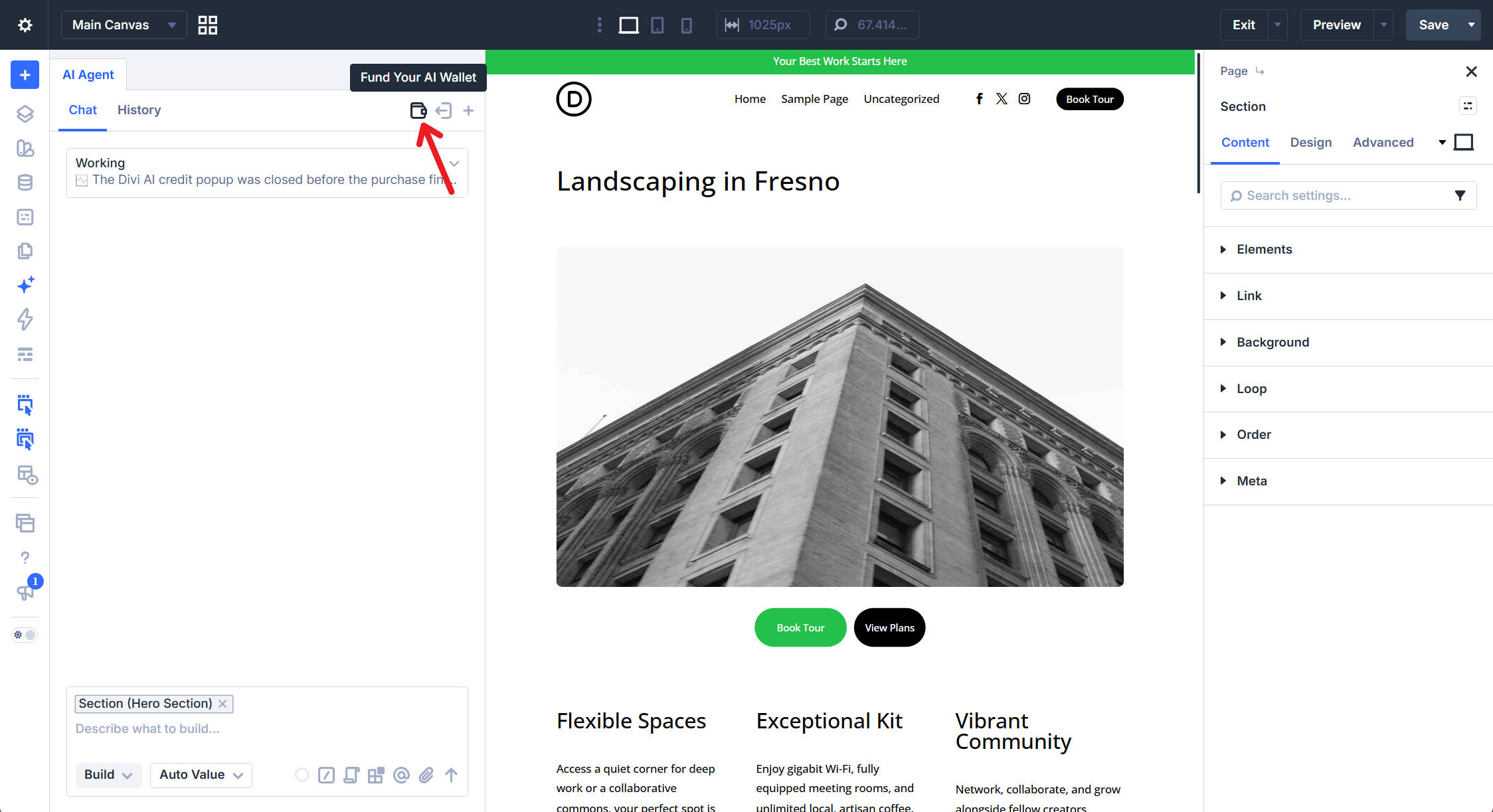
The wallet is tied to your Elegant Themes account and shared across the websites where you use the agent. Open the agent panel in the Visual Builder and click the wallet icon in the top right to see your balance.
What The $5 Monthly Balance Covers
Every Divi AI subscription includes a $5 monthly balance for agent usage, and Divi Pro includes Divi AI. The complimentary balance resets to $5 on your subscription’s renewal date rather than the first of the calendar month. Unused complimentary funds do not roll over.
The agent balance is separate from Divi AI’s text, image, code, and layout generation outside the agent, which remain included in your subscription. Building a layout through the agent uses your wallet, even though layout generation through Divi AI’s other tools is included.
Agent requests connect to external AI models through OpenRouter. The complimentary $5 lets you explore these workflows without purchasing additional agent funds. How much work it covers depends on the models, reasoning effort, and size of your requests.
The balance screen shows your total credits, the complimentary funds from your subscription, and the amounts you can add.
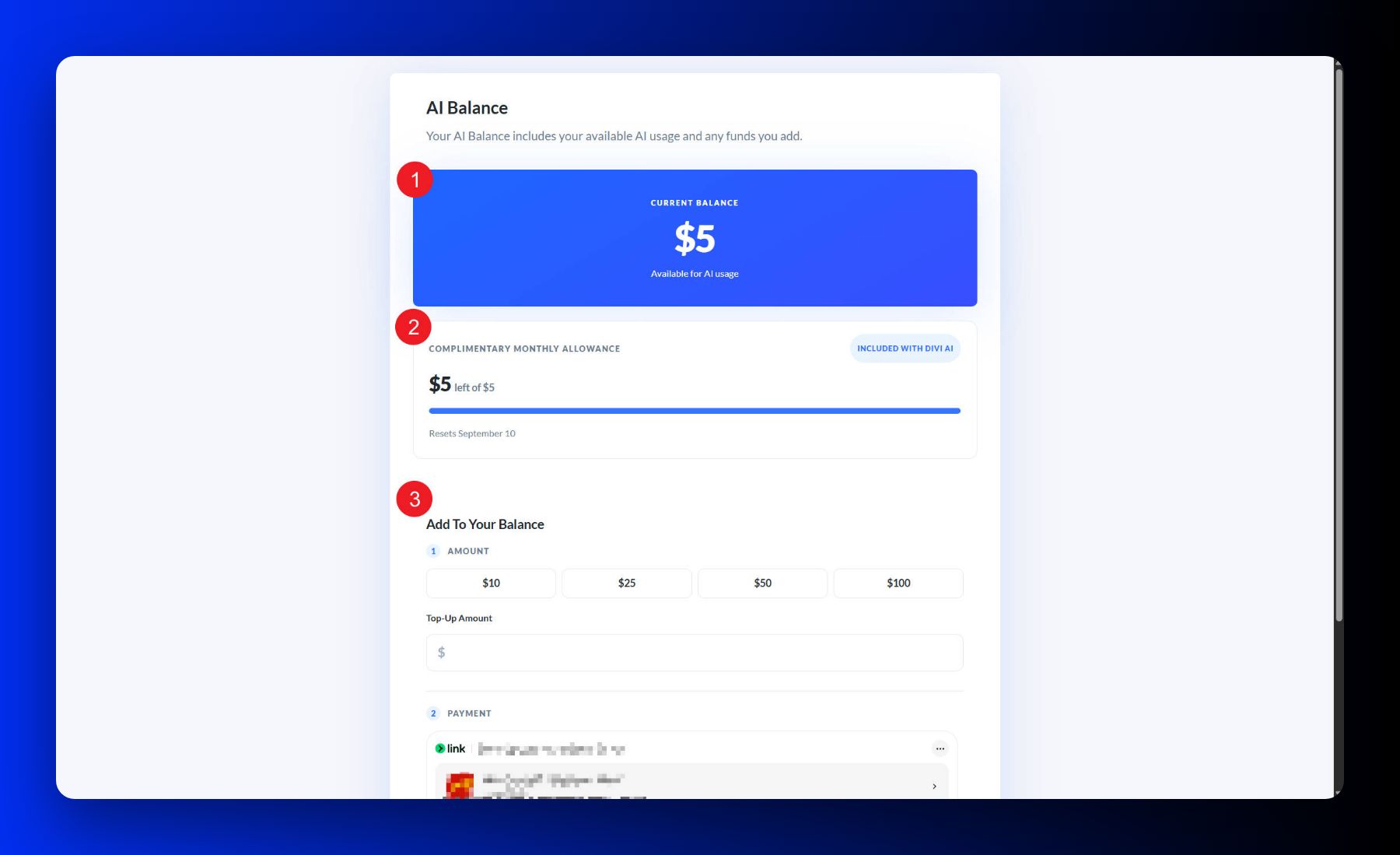
When $5 is not enough, add funds from the same wallet icon by choosing a preset amount or entering your own. Purchased funds are used only after your complimentary monthly balance runs out.
The Four Auto Tiers
Divi AI agents offers four automatic tiers, with Auto Value selected by default. We choose the models behind each tier to balance cost and capability, so you can pick an option that suits the task without configuring individual models yourself.
- Auto Value prioritizes the lowest cost. Start here for simple edits, content tweaks, and small additions.
- Auto Balanced offers a middle ground between cost and capability for work involving several settings or steps.
- Auto Deep Value prioritizes more careful reasoning at a moderate price for tasks that need additional thought.
- Auto Premium prioritizes capability over price for demanding work where a stronger model may reduce the amount of correction needed.
You can change tiers in the chat window as the work changes. The video below shows the four options and their displayed input and output rates per million tokens. Those rates are not the total price of a request. A task can involve several calls and different amounts of input and output, so check the live picker before a larger job.
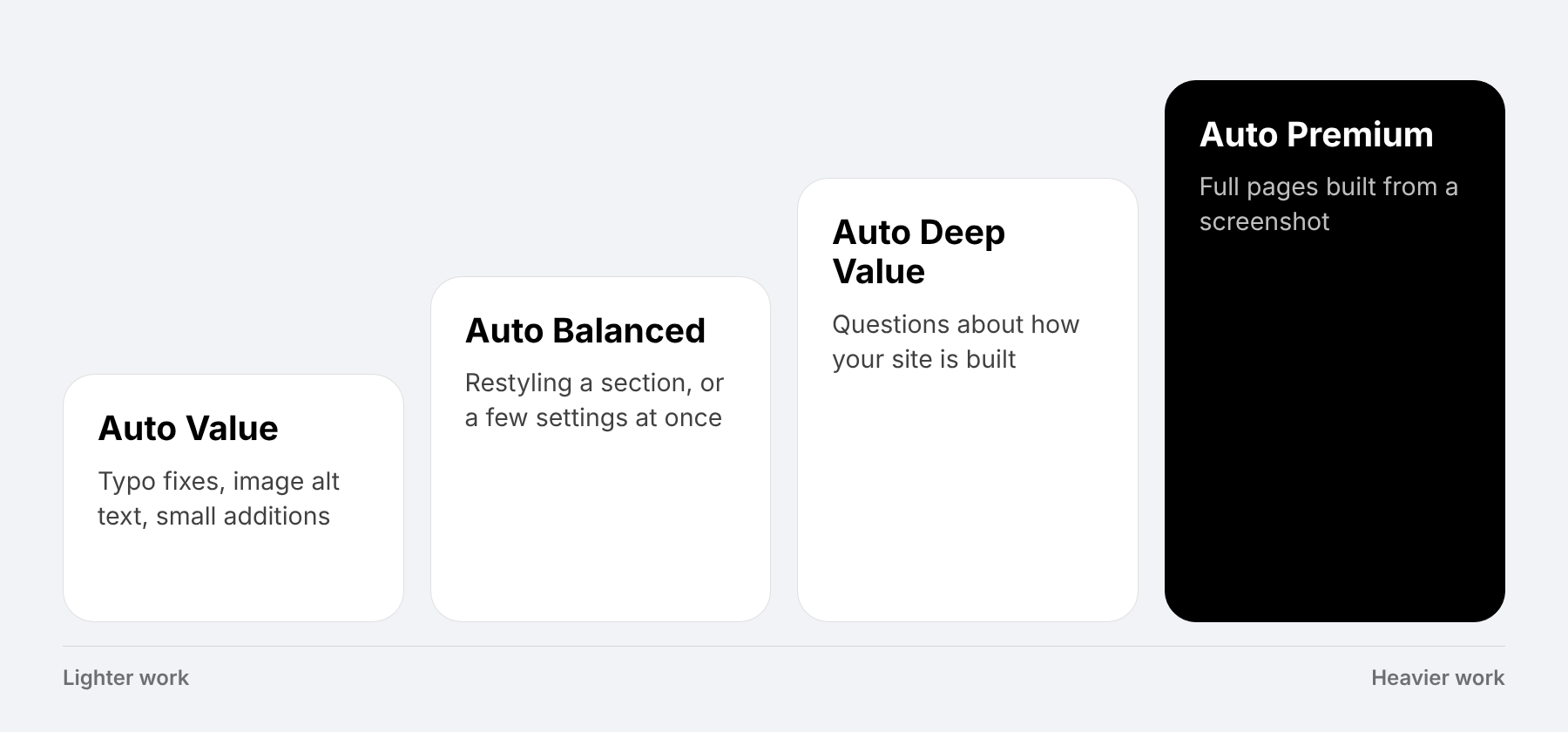
The models behind each tier can change over time as we update the selections. The tiers describe a cost-and-capability trade-off rather than a permanent assignment to one model. The graphic below lines up the four tiers with suitable starting tasks.
Which Model Is Worth Paying For
Start with Auto Value for straightforward work such as typo fixes, content updates, and image alt text. These repetitive tasks are a useful place to save by choosing an affordable tier, then reviewing the result.
Move up when the request needs more judgment. Auto Balanced is a reasonable starting point for restyling a section. Auto Deep Value suits questions about how your site is built, such as which presets or variables a page uses. Auto Premium is worth considering for a full page built from a screenshot or another demanding layout request.
These are starting points, not requirements. Auto Deep Value completed our nine-section screenshot example for about $0.10, so a lower-cost tier can still handle substantial work. A stronger model may produce a better first result, but every tier needs review. Additional requests to correct a build add to the cost, though they will not necessarily cost the same as the original request.
To compare the trade-off on a smaller task, we gave Auto Value and Auto Premium the same request. You can copy it below to try it on an empty section of your own page.
Comparing Results: What You Get For The Extra Cost
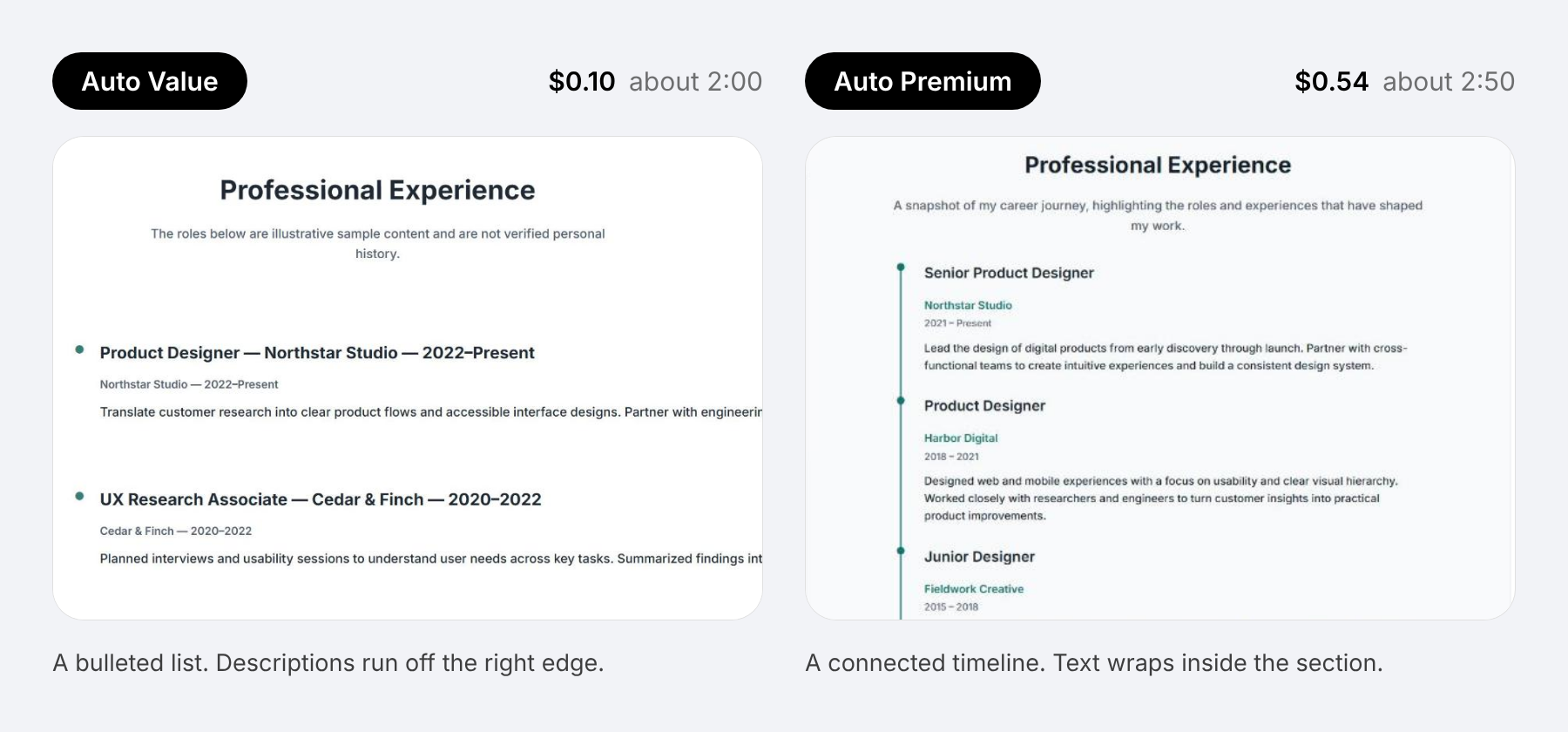
In our comparison, Auto Value finished in about two minutes for $0.10. It returned a bulleted list, with descriptions running off the right edge. Auto Premium took about two minutes and 50 seconds for $0.54 and returned a connected timeline with text that wrapped cleanly.
Premium cost 5.4 times as much in this run, but it also followed the requested design more closely. It added a timeline line with markers, an off-white background, and smaller padding on phones. The Auto Value result would have needed further editing to meet the brief.
For this task, the extra $0.44 bought us a result that needed less correction. Results will vary between requests, so compare the tiers on work you do regularly. Consider both the wallet cost and the time you spend finishing the layout.
Custom Models And Reasoning Effort
For more control, open the model menu in the chat window and use Configure Custom Models. The Custom configuration lets you choose models for four internal roles:
- Planner: Works out the steps needed to complete a request.
- Agent: Carries out the work on your page.
- Layout: Generates page and section layouts.
- Ask: Answers questions in Ask mode.
This lets you prioritize a stronger model for planning or layout generation while choosing a more affordable one for other parts of the workflow. We provide access to hundreds of models through OpenRouter, so you can adjust the configuration to the work you do.
Reasoning effort also affects cost. Where supported, the available levels are Low, Medium, High, and XHigh, with Medium as the default. Increasing effort can help with complex or ambiguous tasks, but typically takes longer and costs more. Leave it on Medium initially, then adjust it when a task gives you a reason to do so.
Keeping Spend Predictable
Match the tier to the task before sending a request, and check your balance before a larger build. Keep the scope specific: if you want one section changed, identify that section rather than asking for a page-wide review. Use Ask mode when you want an explanation without implementation.
For larger jobs, the agent can divide independent work among sub-agents and assign different models to them. That can help distribute the work, but it does not guarantee a lower bill. The total still depends on the models selected and the processing each task requires.
Start with one real request on Auto Value and review both the result and its cost. If the output needs more correction than you want to do, try a stronger tier on a comparable task. Explore Divi AI agents for more examples of what you can build and edit, then choose a task to try on your own page.
The post How Divi AI Agents Pricing Works (And Which Models Are Worthwhile) appeared first on Elegant Themes Blog.
The Tech Zone


Comments
Post a Comment